Many schools already have a firewall, so it is easy to assume that the school internet is safe for students. But a firewall and DNS-level internet filtering solve different problems. A firewall helps protect the school network from technical threats. DNS-level filtering helps control what websites and content categories students can access through that network.
For schools, this difference matters because most day-to-day internet safety issues are not dramatic cyberattacks. They are ordinary browsing problems. A student opens a gaming site in the computer lab. Someone uses a proxy link to bypass a restriction. A smart board pulls up an unsafe video suggestion. A shared device opens adult or gambling content. These may not look like network attacks, but they are still safety, discipline, and responsibility issues inside a school.
Happinetz Campus is built for this student-safety gap. It works as a network-level DNS internet filter for schools and hostels, blocking unsafe content before it reaches devices on the school network. Its product material mentions dual internet policies for students and staff, no apps or VPNs to install, Safe Search, YouTube Restricted Mode, and controls across 15+ content categories and subcategories.
What a firewall does in a school
A firewall is a network security tool. It helps manage traffic entering and leaving the school network. It can support protection against suspicious traffic, intrusion attempts, risky ports, protocols, and certain external threats.
This is useful because schools handle sensitive data. Student records, staff information, parent details, fee systems, internal documents, academic records, and admin portals all need protection. A firewall can be an important part of that security setup.
But a firewall is not the same as child-safe browsing. A school can have a firewall and still have students opening gaming websites, unsafe search results, gambling pages, proxy links, or adult content on school WiFi. That happens because firewalls are mainly designed for network protection, not for deciding whether a website is suitable for a child in a classroom.
What DNS-level internet filtering does
DNS-level filtering works before a website opens. DNS is the system that helps a browser find the website someone wants to visit. When a student types a website name, the DNS request is checked. If the website belongs to a blocked category, the page does not load.
For schools, this is useful because the rule can sit on the network instead of every device. Computer lab systems, smart boards, shared tablets, teacher laptops, library computers, hostel networks, student WiFi, and admin systems can all follow the school’s internet policy when they are connected to the campus network.
The Happinetz compliance document says Happinetz Campus works with existing routers, needs no new hardware, requires no network rewiring, and can be deployed with minimal technical expertise.
Why schools need more than a firewall
A firewall may protect the school network, but it does not automatically stop students from accessing content that should not be available during school hours.
That is where schools often see the gap. Adult websites may still load. Gaming and streaming sites may distract students in labs. Proxy websites may help bypass basic restrictions. Unsafe downloads may expose shared computers to malware. Search results may show inappropriate images or videos.
These problems need content-aware filtering. Schools need to block categories such as adult content, gambling, gaming, violent content, self-harm-related content, malware, ransomware, unsafe downloads, proxy tools, and VPN bypass routes. Happinetz Campus material mentions blocking 22 million+ unsafe websites and monitoring 110 million+ websites and applications.
Why DNS-level filtering fits school environments
School networks are rarely simple. One lab computer may be used by different classes in a day. A smart board may be used by several teachers. Tablets may move between rooms. Libraries may have shared computers. Hostels may have WiFi. Staff may bring their own laptops. Some schools may allow BYOD in limited ways.
Installing controls on every device is hard to maintain in this environment. DNS-level filtering is easier because the school applies the safety layer through the network. When a device uses the school WiFi or LAN, the filtering policy can apply.
This also helps when student and staff access need to be different. Students may need stricter filtering. Teachers may need educational videos, research sources, and classroom tools. Admin teams may need school portals, payment systems, and official communication platforms. Happinetz Campus supports separate student and staff internet policies through its dual policy framework.
Firewall vs DNS-level filtering
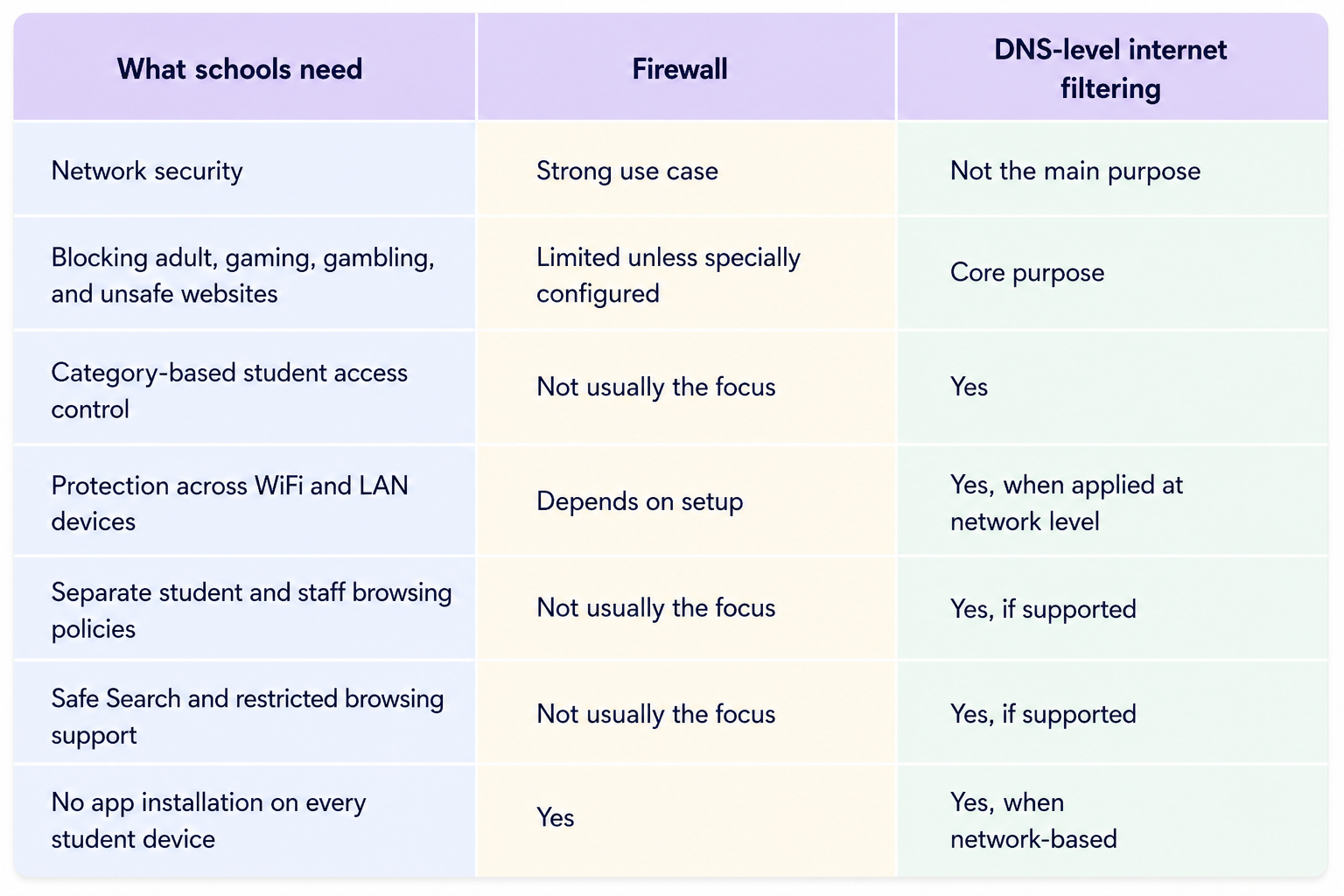
A school does not need to think of this as choosing one over the other. A firewall helps secure the network. DNS-level filtering helps make student browsing safer. The stronger setup uses both for the job each is meant to do.
What schools should check
A school that already has a firewall should still check whether students can access adult content, gambling, gaming, proxy sites, unsafe downloads, or distracting platforms on school WiFi. It should also check whether student and staff policies are separate, whether Safe Search and YouTube Restricted Mode are active, and whether filtering works across labs, smart classrooms, libraries, hostel networks, and shared devices.
If the firewall is present but student browsing is still open, the school has network security but not enough internet safety.
FAQs
Is a firewall enough for school internet safety?
No. A firewall helps protect the network, but schools also need content filtering to control what students can access online.
What is DNS-level filtering for schools?
DNS-level filtering checks website requests before pages open. If a website belongs to a blocked category, such as adult content, gambling, gaming, malware, or proxy tools, access is stopped.
Does DNS-level filtering replace a firewall?
No. A firewall and DNS-level filtering have different roles. Schools can use both together: one for network security, the other for safer student browsing.
Can DNS-level filtering work without apps on student devices?
Yes. When applied at the network level, DNS filtering can work across devices connected to school WiFi or LAN without installing apps on every device.
Why do schools need separate student and staff policies?
Students need stricter browsing rules, while teachers and administrators need access to educational and operational resources. Separate policies keep student access safer without disrupting school work.
Closing remarks
A firewall is useful for protecting the school network, but it does not automatically make the internet safe for children.
Schools also need a filtering layer that understands content categories and student access. DNS-level internet filtering helps block harmful and distracting websites before they open, without making the school manage every device separately.
For schools, the clearest approach is to use the firewall for network security and DNS-level filtering for student-safe internet access.