A school WiFi network should not behave like open public internet. Once students are connected, they should not be able to freely access adult websites, gaming portals, gambling pages, proxy links, unsafe downloads, or random entertainment platforms during school hours.
The cleanest way to manage this is through network-level filtering. Instead of installing controls on every laptop, smart board, tablet, or lab computer, the school sets access rules at the WiFi or LAN level. Any device connected to that network follows the same safety policy.
This is what makes blocking practical for schools. The IT team is not chasing one website after another, and teachers are not expected to monitor every screen in real time.
Why manual website blocking fails in schools
Many schools begin with manual blocking. Someone reports a gaming site, the IT team blocks it. Someone finds an adult site, that gets blocked too. Then a student opens a mirror link, a proxy site, a new game, or a different browser route.
This is why link-by-link blocking becomes a losing game.
The problem is not one website. The problem is the category of access. If gaming is not allowed during school hours, the school needs to restrict gaming as a category. If adult content is unsafe for children, the school needs adult-content filtering across the network. The same applies to gambling, malware, proxy websites, violent content, and other non-learning distractions.
What should be blocked on school WiFi?
Most schools should begin with the obvious high-risk categories: adult content, gambling, malware, proxy tools, VPN bypass pages, violent content, self-harm content, piracy links, and unsafe downloads.
Then comes the distraction layer. Gaming sites, short-video platforms, entertainment pages, and social media may not always be “dangerous,” but they can derail a classroom fast. A student who is supposed to be using a shared computer for research should not end up playing browser games or scrolling videos in the lab.
The point is not to make the internet unusable. Teachers may need videos. Admin teams may need social media. Students may need search, learning platforms, articles, and assessments. Good filtering allows useful access while closing the doors that do not belong in a school environment.
The better approach: block categories, not individual links
A strong school WiFi filter should let the school control content by category.
So instead of making a never-ending blocked list, the school can decide:
Adult content stays blocked.
Gaming stays blocked for students.
Gambling stays blocked.
Proxy and VPN bypass sites stay blocked.
Educational resources remain open.
Teacher access can be wider than student access.
Admin access can include operational tools.
That is a cleaner way to run campus internet. It also avoids the usual panic after an incident, where the school discovers a harmful site only after a child has already accessed it.
Why DNS-level filtering works well for schools
DNS-level filtering is one practical way to control school WiFi.
DNS works like an address book for the internet. When someone tries to open a website, the DNS helps locate it. With DNS-level filtering, the request is checked before the website opens. If the site belongs to a blocked category, it does not load.
For schools, this is useful because the rule sits at the network level. It can cover lab computers, smart boards, tablets, staff devices, and shared systems connected to the school WiFi or LAN. The school does not have to install and maintain a separate app on every device.
That matters because school devices keep changing. New smart boards come in. Teachers bring laptops. Labs get upgraded. Shared systems move between rooms. A network-level system is easier to keep consistent.
Student access and teacher access should not be the same
One mistake schools make is applying the same internet rule to everyone.
That either blocks too much for teachers or leaves too much open for students.
Students need stricter access during school hours. Teachers may need YouTube for a lesson, research sites for preparation, or wider access to educational tools. Admin teams may need payment portals, school management platforms, email tools, and social media for communication.
A good filtering system should allow separate policies. Student internet can be tightly controlled. Teacher and admin access can stay practical. This is how schools avoid turning internet safety into an internet ban.
Search results need attention too
Unsafe access does not always begin with a website name.
A child may search for something harmless and land on inappropriate images, video thumbnails, misleading links, or unsafe pages. Older students may know exactly what to search for. Younger ones may click without understanding what they are opening.
So blocking adult websites is not enough. Safer search controls should be part of the setup. The school should reduce unsafe exposure through search engines, images, video recommendations, and browsing routes wherever possible.
Bypass routes cannot be ignored
Once students realise some websites are blocked, a few will try workarounds. Proxy websites, VPN apps, mirror links, alternate browsers, extensions, URL shorteners, and mobile hotspots are common routes.
No filter should claim that bypassing can never happen. But a school-grade filtering system should block common proxy and VPN categories, update regularly, and make bypassing harder.
Written rules help, but the network should not depend only on student honesty.
Where Happinetz Campus fits in
Happinetz Campus is built for schools that want to block harmful and distracting content across campus WiFi without managing every device manually.
It uses AI/ML-powered internet filtering and DNS-level protection, so schools can control unsafe categories across devices connected to WiFi and LAN. That makes it useful for computer labs, smart classrooms, shared devices, teacher laptops, admin systems, and BYOD environments where allowed. You can start your free trial today.
Schools can keep student access stricter while giving teachers and admins the access they need. The result is not a locked-down internet, but a safer and more focused one.
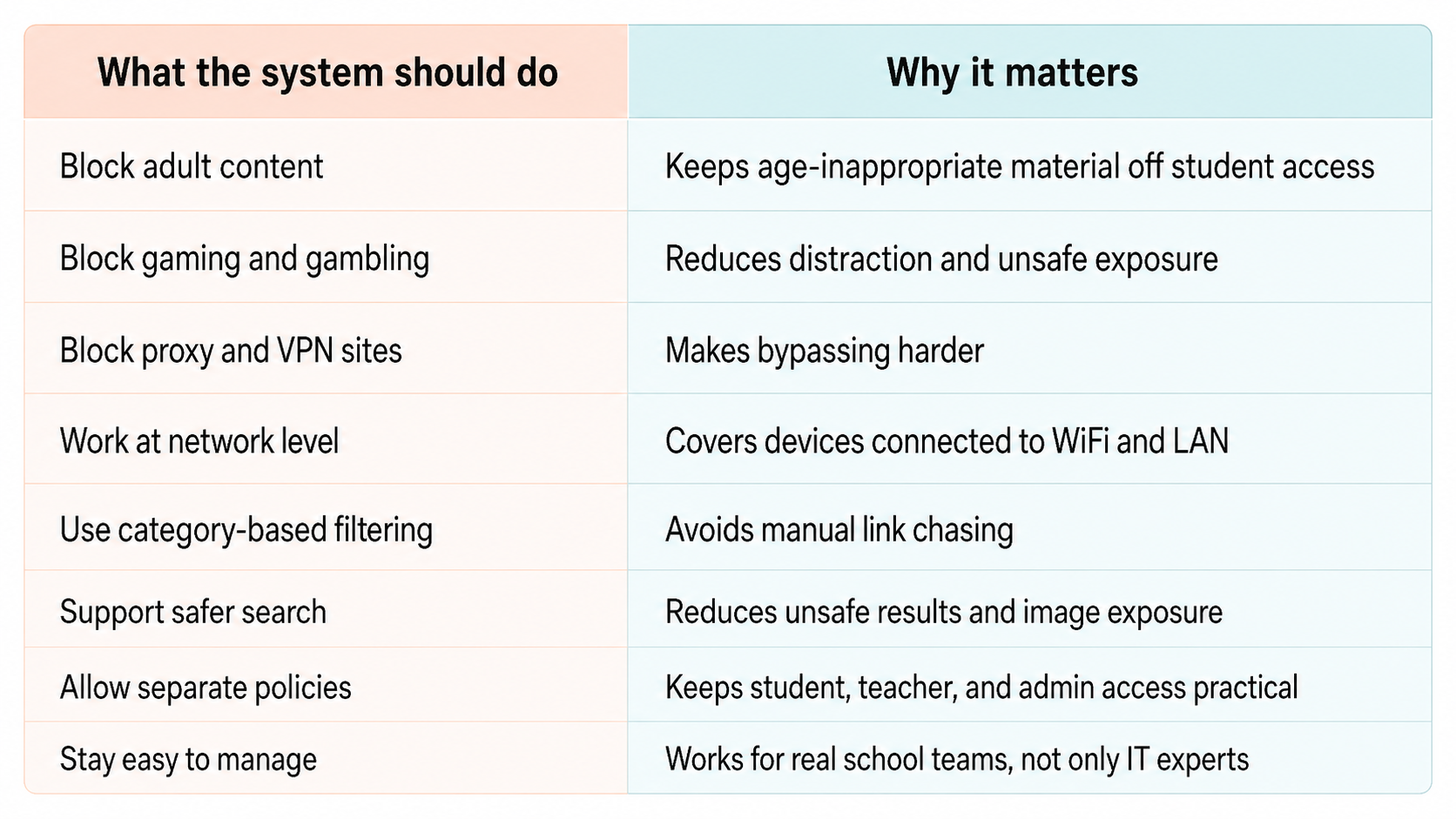
Quick school WiFi filtering checklist
FAQs
How can schools block adult websites on WiFi?
Schools can block adult websites by using network-level or DNS-level filtering. This allows adult-content categories to be blocked across devices connected to the school WiFi or LAN.
Can schools block gaming websites during school hours?
Yes. Gaming can be restricted as a category for students while still allowing teachers and administrators to access the platforms they need.
Is manual website blocking enough for schools?
No. Manual blocking is too slow because new sites, mirror links, and proxy pages keep appearing. Category-based filtering is more practical.
Can students bypass school WiFi filters?
Some students may try using VPNs, proxies, alternate browsers, or hotspots. A stronger filtering system should block common bypass categories and update regularly.
Can schools block unsafe websites without blocking useful educational content?
Yes. A good school internet filter should block harmful categories while allowing learning platforms, research sites, and approved classroom resources.
Final word
School WiFi should support learning without leaving the whole internet open to students.
The right filtering system helps schools block adult content, gaming, gambling, unsafe websites, and distracting platforms at the network level. It keeps the useful parts of the internet available and makes the risky parts harder to reach.
That is the balance schools need: not fear of technology, not blind access, but controlled internet that fits a learning environment.