Schools in India should choose an internet safety solution that works across the campus network, blocks harmful content by category, supports safer search, reduces student distractions, allows different access rules for students and staff, and is simple for the school team to manage.
A good solution should not depend on teachers watching every screen or the IT team blocking websites one by one. It should make the school internet safer by default.
School internet is no longer limited to one computer lab. Students now use smart classrooms, shared devices, online learning platforms, digital assessments, school WiFi, and sometimes their own devices on campus. The same network that supports learning can also expose children to adult content, gaming sites, gambling platforms, violent content, unsafe search results, proxy websites, and endless distraction.
So the question is if the school internet is safe for children to use.
What is an internet safety solution for schools?
An internet safety solution for schools is a system that helps control what students can access online when they are using the school network.
It should block unsafe, age-inappropriate, and distracting content while allowing educational access to continue. For schools, this usually includes filtering adult websites, gambling sites, gaming platforms, proxy tools, unsafe search results, violent content, malware pages, and non-educational entertainment during school hours.
This is different from ordinary WiFi.
WiFi gives students internet access. Internet safety decides what kind of access is allowed.
Why routers, antivirus, and firewalls are not enough
Many schools already have routers, antivirus software, or a firewall. These are useful, but they do not solve the full child-safety problem.
A router connects devices to the internet.
Antivirus protects devices from some malware threats.
A firewall protects the school network from certain external attacks.
But students may still open unsafe websites, search inappropriate terms, use gaming platforms, watch distracting videos, or try proxy links if content filtering is not in place.
This is why schools need a dedicated internet safety layer, especially when children are the primary users.
Choose network-level protection, not device-by-device control
A school should avoid solutions that depend on installing apps or controls on every individual device.
That may work at home, but it becomes difficult inside a school. Schools have computer lab desktops, smart boards, teacher laptops, admin systems, tablets, library computers, and shared devices. New devices may keep getting added.
A network-level solution is easier because safety rules are applied through the school network. Devices connected to school WiFi or LAN follow the same filtering rules without separate setup on each device.
For Indian schools with limited IT time, this is usually more practical.
Look for category-based filtering
Manual website blocking is weak for schools.
If a school blocks one gaming website, students may find another. If one proxy site is blocked, ten more may appear. Unsafe websites keep changing, and no school team can manually chase every link.
Category-based filtering is stronger because it blocks entire types of content.
A school should be able to control categories such as:
- Adult content
- Gambling
- Gaming
- Violence
- Self-harm content
- Malware and unsafe websites
- Proxy and VPN bypass pages
- Non-educational entertainment
- Social media, where needed during school hours
This makes filtering proactive instead of reactive.
Make search safer, not just websites
Unsafe content does not always come from typing a website address.
Children can reach harmful content through search results, image searches, video thumbnails, comments, ads, suggested links, and misspelled searches.
That is why the right school internet safety solution should support safer search and browsing controls. It should reduce the chances of students being exposed to unsafe results while using search engines or browsing for school work.
This is especially important for younger students because accidental exposure is common. A child may start with a harmless query and still land on something inappropriate.
Allow different access for students, teachers, and admins
One internet rule for everyone does not work in a school.
Students need stricter access. Teachers may need educational videos, research material, teaching resources, and classroom tools. Admin teams may need access to finance portals, communication platforms, school management software, and operational websites.
The right solution should allow different policies for different groups.
This keeps students protected without blocking useful access for teachers and staff.
A school internet safety system should support learning, not shut the internet down completely.
Make sure it can reduce bypass attempts
Schools should assume that some students will try to bypass restrictions.
They may use VPN apps, proxy websites, alternate browsers, mirror links, browser extensions, URL shorteners, or mobile hotspots.
No vendor should claim that no system can ever be bypassed. That is not honest. But a serious solution should block common bypass categories, update its filtering regularly, and give the school better control over what is happening on the network.
For middle and senior school students, this is especially important.
Check if the solution is easy to manage
A school internet safety solution should not become another complicated IT burden.
Many Indian schools do not have large IT teams. One person may already be handling WiFi issues, smart boards, printers, computer labs, ERP systems, parent apps, and device troubleshooting.
So the solution should be simple to set up, easy to review, and clear enough for school leadership to understand.
If every small change requires vendor support, device-by-device updates, or technical troubleshooting, the school may not use the system properly.
Compare full cost, not just starting price
The cheapest option may not be the best option.
Schools should check the full cost, including hardware, installation, annual subscription, per-device charges, support, maintenance, upgrades, and what happens when more devices are added.
A solution that charges per device can become expensive as the school adds more smart boards, tablets, lab systems, or staff devices.
A better solution should have predictable pricing and should not punish the school for expanding digital learning.
What should schools compare before choosing?
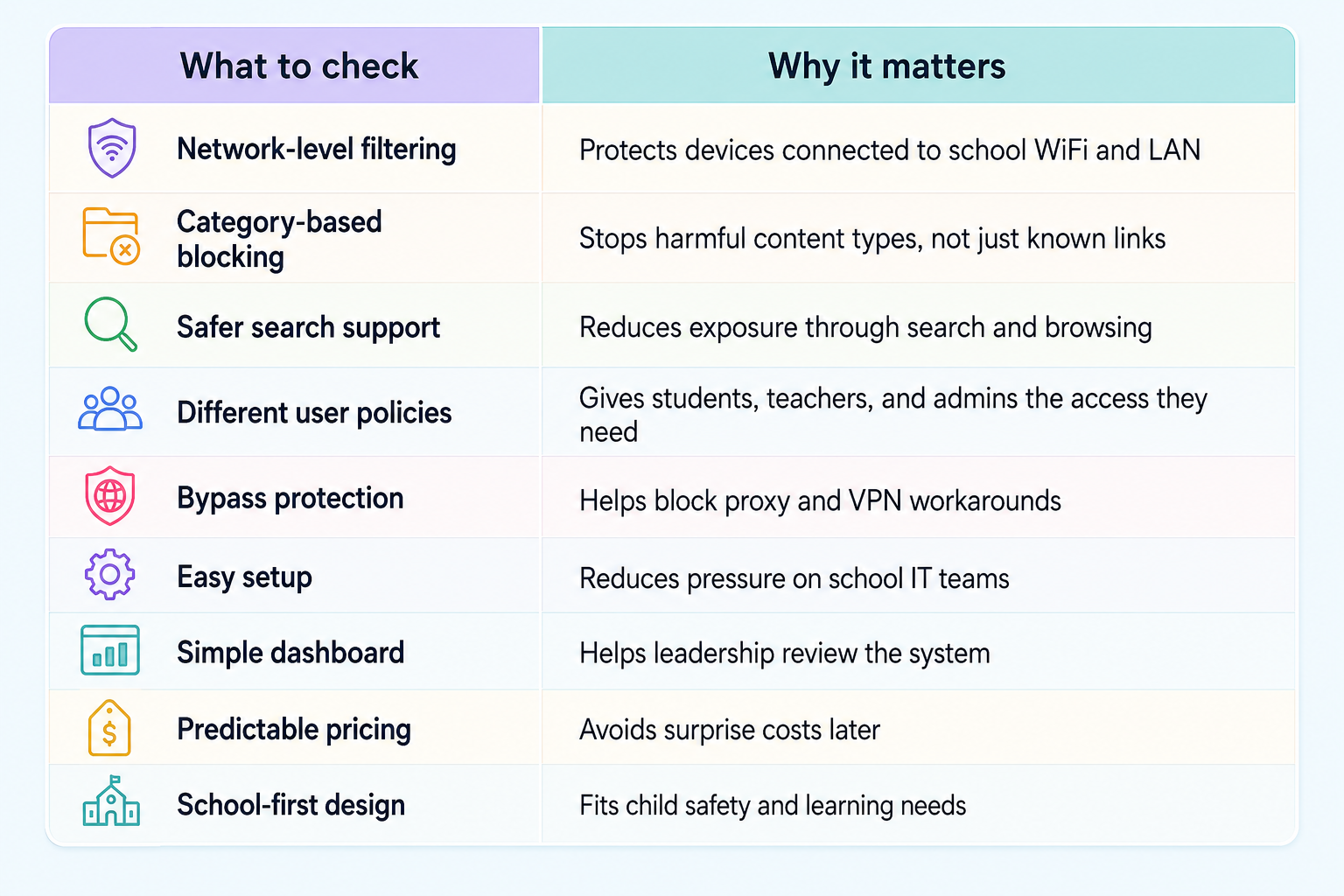
Where Happinetz Campus fits in
Happinetz Campus is built for schools that want safer and more focused internet across the campus without adding heavy IT work.
It uses AI/ML-powered internet filtering and DNS-level protection to help schools block harmful, unsafe, and distracting content across devices connected to the school network. Since it works at the network level, schools do not need to install apps on every student device.
Happinetz Campus also supports centralised policy control, so schools can create safer access rules for students while allowing teachers and administrators the access they need.
You can start your free trial today, right here.
For school leaders, this means three things: safer internet for students, fewer digital distractions during learning hours, and a visible internet safety system the school can explain to parents.
Common mistakes schools should avoid
The biggest mistake is assuming that an internet provider will handle safety. Internet providers give connectivity. They do not decide what is age-appropriate for children.
Another mistake is thinking antivirus is enough. Antivirus protects devices from some threats, but it does not stop students from accessing adult content, gaming sites, gambling platforms, or unsafe search results.
Schools should also avoid relying only on manual blocking or teacher supervision. Both are useful, but both are limited. A school needs a system that works even when no one is watching every screen.
FAQs
What is the best internet safety solution for schools in India?
The best internet safety solution for schools in India is one that works across the campus network, blocks harmful content by category, supports safer search, allows different access rules for students and staff, and is easy for the school team to manage.
Is a firewall enough for school internet safety?
No. A firewall protects the network from certain security threats. Internet filtering controls what students can access online. Schools need both network security and content safety.
Can schools block harmful websites without installing apps on every device?
Yes. Network-level or DNS-level filtering can apply safety rules through the school network, so connected devices follow the same internet policy without app installation on every device.
Why is category-based filtering better than manual blocking?
Category-based filtering is better because harmful websites keep changing. It lets schools block entire content types such as adult content, gambling, gaming, proxy tools, and unsafe websites instead of chasing individual links.
Why should parents care about school internet filtering?
Parents should care because children use school internet for learning, research, and digital activities. A school with proper internet filtering can reduce exposure to unsafe and distracting content during school hours.
Final word
Choosing an internet safety solution is not just an IT decision. It is part of how a school protects children in a digital learning environment.
A school that provides internet access also has to decide what kind of internet reaches its students. The right solution should be campus-wide, simple to manage, child-focused, and strong enough to work quietly in the background every day.