AI-powered internet filtering for schools is a system that uses machine learning and web intelligence to understand, categorise, and control what students can access online through the school network.
Instead of blocking only a fixed list of websites, it looks at websites and apps by category. Adult content, gambling, gaming, proxy tools, malware, violent content, and unsafe pages can be blocked at the network level, while educational platforms remain accessible.
For a school, students should get the internet they need for learning, not the entire open internet.
Why schools are looking at AI-powered filtering now
A few years ago, school internet mostly meant a computer lab and maybe a few staff systems. That has changed. Schools now run smart classrooms, online assessments, learning apps, digital panels, teacher laptops, shared devices, admin portals, and campus WiFi.
The old method of blocking a few websites manually cannot keep up with this.
New websites, apps, gaming pages, proxy tools, and unsafe links appear every day. Students also learn workarounds quickly. If the school only blocks known links, the system becomes outdated almost immediately.
AI-powered filtering helps because it can classify and control websites by type, not just by name. Happinetz, for example, says its AI/ML filtering system monitors over 110 million websites and apps and blocks over 22 million adult and unsecured ones.
How AI-powered internet filtering works
AI-powered filtering usually works in three layers.
First, websites and apps are identified. The system checks the domain or online destination a user is trying to access.
Then, the website is categorised. It may be marked as education, news, gaming, adult content, gambling, entertainment, malware, social media, shopping, or another category.
Finally, the school’s policy is applied. If students are not allowed to access gaming or adult content, those categories are blocked. If teachers are allowed to use educational videos, those can stay open.
This means the school does not have to block every harmful website manually. The system understands the kind of content being accessed and acts based on the rules set by the school.
What makes it different from manual blocking
Manual blocking is like writing down a list of doors students should not open. AI-powered filtering is closer to controlling the whole building by zones.
If a school manually blocks one gaming site, another gaming site may still open. If one proxy link is blocked, students may find a new one. If an unsafe website changes its domain, the old block may not work.
AI-powered filtering is stronger because it works by category and keeps updating. It is not perfect, and no honest system should claim to be impossible to bypass forever. But it is much better suited to a school environment than link-by-link blocking.
What is DNS-level filtering?
Many school internet filters work at the DNS level.
DNS is like the internet’s address book. When someone types a website name, the DNS helps find where that website lives. DNS-level filtering checks the website request before the page opens. If the website belongs to a blocked category, access is stopped.
For schools, DNS-level filtering is useful because it can work across devices connected to the school WiFi or LAN. The school does not need to install an app on every student device.
Happinetz Campus uses DNS-level protection across devices on WiFi and LAN, with no per-device app licences. Its Campus FAQs also say schools do not need to install apps, VPNs, or manual configurations on student or teacher devices.
What can schools block with AI-powered filtering?
A school can use AI-powered filtering to control harmful, unsafe, or distracting categories of content.
This may include adult websites, gambling, gaming, malware, proxy websites, VPN bypass pages, violent content, self-harm content, unsafe apps, and non-educational entertainment.
The purpose is not to block the internet completely. The purpose is to keep the learning environment focused.
A student may need access to a science video, a government education portal, a research article, or an online assessment. They do not need access to adult websites, gambling links, gaming portals, or random entertainment pages during school hours.
Can students and teachers have different access?
Yes, and this is one of the most useful parts for schools.
Students, teachers, and administrators do not need the same internet. A student policy can be stricter. A teacher policy can allow more educational resources. An admin policy can allow school operations, communication tools, and finance portals.
Happinetz Campus mentions centralised campus-wide policy control and a Dual Policy Framework where schools can create separate internet filtering policies for students and staff on the same campus network.
This avoids two bad extremes: blocking too much for teachers, or leaving too much open for students.
Does AI filtering replace a firewall?
No. AI-powered internet filtering and firewalls are not the same thing.
A firewall mainly protects the network from external attacks, suspicious traffic, ports, protocols, and intrusion attempts. Internet filtering controls what users on the network can access.
For a school, both can matter. But a firewall alone does not automatically make the internet child-safe.
A school may have a firewall and still allow students to open gaming sites, unsafe search results, gambling pages, or age-inappropriate content. Happinetz’s Campus FAQs also make this distinction, saying firewalls are designed for network protection, while student internet safety needs content awareness and real-time categorisation.
Why AI filtering is useful for Indian schools
Indian schools often have mixed digital setups. One campus may have smart boards, computer labs, teacher laptops, shared devices, BYOD access, library systems, and admin computers running together.
Managing safety device by device is not practical for many schools.
AI-powered, network-level filtering fits better because it works through the campus network. It can also reduce the pressure on teachers and IT teams, since the system automatically applies the school’s internet policy. Happinetz says its Campus solution protects all devices connected to the campus network, including labs, smart boards, tablets, laptops, desktops, and BYOD devices.
This is especially useful when schools want digital learning without turning every classroom into a supervision problem.
What school leaders should check
Do not judge an AI-powered internet filter only by the word “AI.” That word is easy to add and often badly explained.
A school should check whether the solution actually offers:
|
|
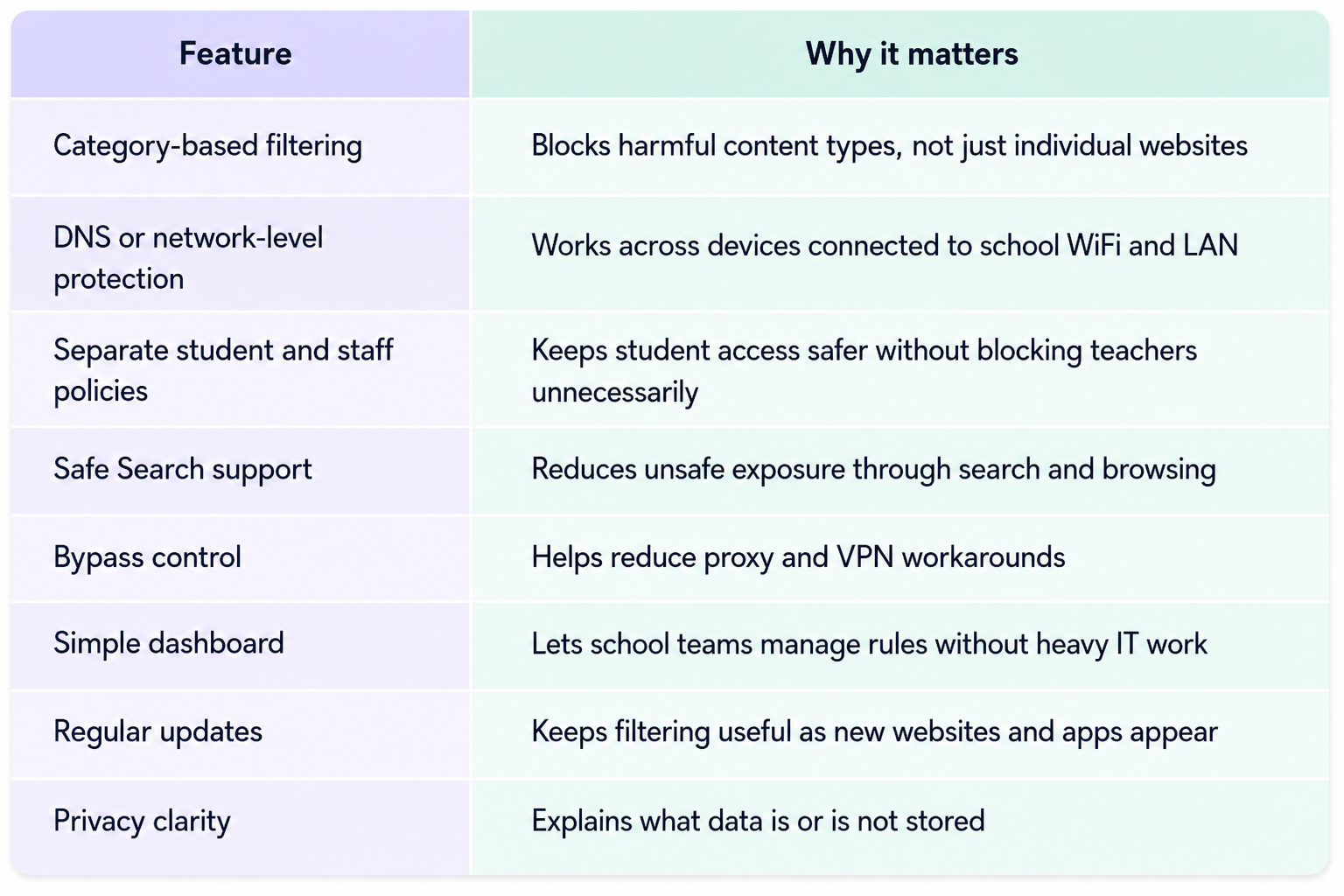
The privacy point matters. Schools should know whether a system inspects page content, stores student browsing data, or collects personal information. Happinetz says its Campus filtering works at the DNS level and does not store personally identifiable student data.
Where Happinetz Campus fits in
Happinetz Campus is an AI/ML-powered internet filtering solution built for schools and campuses.
It works at the DNS/network level, so schools can protect devices connected to WiFi and LAN without installing apps on every device. It supports category-based filtering, centralised policy control, Safe Search and YouTube Restricted Mode, and separate policies for students and staff. Its Campus pricing page mentions 15+ categories and subcategories, continuous updates and threat intelligence, DNS-level protection, no per-device app licences, and cloud-based setup with zero infrastructure costs. You can start your free trial today right here.
For school leaders, the value is not “AI” as a buzzword. The value is safer student access, fewer distractions, easier policy control, and less manual work for teachers and IT teams.
FAQs
What is AI-powered internet filtering for schools?
AI-powered internet filtering for schools is a system that uses machine learning and website categorisation to block harmful, unsafe, or distracting online content on the school network.
How does AI internet filtering work?
It identifies the website or app being accessed, categorises it, and then applies the school’s access policy. If the category is blocked for students, the website does not open.
Is AI-powered filtering better than manual website blocking?
Yes, for schools. Manual blocking depends on known links. AI-powered filtering can work by category and update as new websites and apps appear.
Can AI filtering work without installing apps on every device?
Yes, if it works at the DNS or network level. This allows schools to apply internet safety rules across devices connected to WiFi or LAN.
Is AI-powered internet filtering the same as a firewall?
No. A firewall protects the network from certain security threats. Internet filtering controls what students and staff can access online.
Can schools allow educational websites while blocking gaming and adult content?
Yes. A good filtering solution should allow schools to block unsafe or distracting categories while keeping educational platforms accessible.
Final word
AI-powered internet filtering is not about making school internet complicated. It is about making it safer by default.
Schools should not have to chase every harmful link manually or depend only on teachers watching screens. A good system should understand categories, apply school policies, reduce bypass routes, and keep learning access open.
For schools in India, this is becoming part of basic digital responsibility: if children are using the internet on campus, the school should know what kind of internet is reaching them.