School internet is safe for children when it blocks harmful and age-inappropriate content, reduces digital distractions, keeps search results safer, works across all devices connected to the school network, and gives the school clear control over student access.
Safe school internet is not just fast WiFi. It is not just a router password. It is not only a firewall or antivirus software.
For children, safe internet means they can use digital tools for learning without being exposed to adult content, gambling sites, violent material, unsafe search results, proxy websites, gaming distractions, or platforms that pull them away from classwork.
For parents, it means the school is not leaving online safety to chance.
For school leaders, it means internet access is being managed as part of student safety and digital responsibility.
Why school internet safety matters now
Schools in India are using more digital tools than before. Classrooms have smart boards. Computer labs are online. Teachers use videos, worksheets, research links, learning apps, assessments, and digital platforms. Students may use shared computers, tablets, library systems, or school WiFi for learning.
This has made the internet useful inside schools. It has also made internet safety more serious.
A child does not need to search for something obviously unsafe to land on harmful content. It can appear through image search, video recommendations, pop-ups, misspelled words, ads, comment sections, proxy links, or links shared by another student.
This is why schools need more than supervision. Teachers cannot watch every screen and every tab in real time. The school network itself needs safety controls.
Safe school internet blocks harmful content by category
A safe school internet system should block entire categories of harmful or age-inappropriate content.
This usually includes adult websites, gambling platforms, violent content, self-harm-related content, malware pages, proxy websites, VPN bypass pages, and other unsafe online spaces.
Blocking websites one by one is weak. The internet changes too quickly. If one gaming site or adult site is blocked, another may still open. Category-based filtering works better because it focuses on the type of content, not only the exact website address.
For parents, this is an important question to ask schools: “Do you block harmful categories across the school network, or only a few known websites?”
Safe school internet reduces distraction, not just danger
Internet safety is not only about blocking extreme content.
Schools also need to manage distraction. Gaming websites, entertainment platforms, random video browsing, social media, and non-educational content can turn a digital classroom into an unfocused one.
A school may want some platforms available for teachers but restricted for students during class hours. That is why safe internet should allow controlled access, not a complete shutdown.
The aim is simple: children should be able to use the internet for learning without getting pulled into unrelated content every few minutes.
Safe school internet makes search safer
Children often reach unsafe content through search, not direct website visits.
A harmless search can lead to inappropriate images, suggested videos, misleading links, or pages that are not suitable for school. This is especially risky for younger students because they may not know what to avoid or how to exit quickly.
Safe school internet should support safer search and browsing controls. This means reducing exposure to unsafe results, restricting inappropriate content where possible, and making it harder for children to move from a normal search to a harmful page.
Website blocking alone is not enough if unsafe search results still appear freely.
Safe school internet works across the whole campus
A school cannot protect children properly if safety rules apply only to some devices.
Internet access may happen through computer labs, smart classrooms, tablets, teacher devices, shared library computers, admin systems, and student devices where allowed. If only a few devices are protected, the school still has gaps.
A safer approach is network-level filtering. This allows the school to apply safety rules through the school WiFi or LAN, so connected devices follow the same internet policy.
This is useful for Indian schools because many do not have large IT teams. Managing every device separately can quickly become messy.
Safe school internet has different rules for students and adults
Children, teachers, and administrators do not need the same internet access.
Students need stricter filtering. Teachers may need educational videos, reference material, classroom resources, and research links. Admin teams may need access to school management systems, finance portals, email platforms, and operations tools.
A safe school internet system should allow separate policies for different groups.
This prevents two common problems. The first is overblocking, where teachers cannot access useful teaching material. The second is underblocking, where students get access that should only be available to adults.
Good safety is not about blocking everything. It is about giving the right access to the right people.
Safe school internet reduces bypass attempts
Students may try to bypass restrictions, especially in middle and senior school.
They may use VPN apps, proxy websites, alternate browsers, mirror links, URL shorteners, browser extensions, or mobile hotspots. A school should not assume that written rules will be enough.
No system can honestly promise that bypassing is impossible forever. But a serious internet safety solution should block common bypass routes and keep updating its filtering intelligence.
For school leaders, this is one of the most important checks. A filter that looks strong but fails the moment a student opens a proxy site is not enough.
Safe school internet is visible to school leaders
A school should not have to guess whether its internet safety system is working.
There should be some level of visibility. School leaders or authorised administrators should be able to understand what categories are blocked, what policies are active, and whether student access is being managed properly.
This does not mean spying on every child. It means the school should know that its safety rules are active and reviewable.
Visibility also helps schools communicate better with parents. Instead of saying “we monitor internet use,” the school can say, “we have campus-wide filtering and student-safe access rules in place.”
What parents should look for
Parents do not need to understand every technical term. They only need to know whether the school has a real system or only a vague rule.
A parent can ask:
- Is the school WiFi filtered for children?
- Are adult, gambling, gaming, and unsafe websites blocked?
- Does filtering work in computer labs and smart classrooms?
- Are search results made safer for students?
- Can students use proxy websites or VPNs to bypass restrictions?
- Are students and staff given different levels of access?
- Who reviews the school’s internet safety settings?
These are fair questions. If children are using the internet at school, parents have the right to know how that access is being made safe.
What school leaders should look for
For school leaders, safe internet should be practical. It should not depend on complicated setup, constant IT work, or device-by-device management.
A strong school internet safety solution should offer:
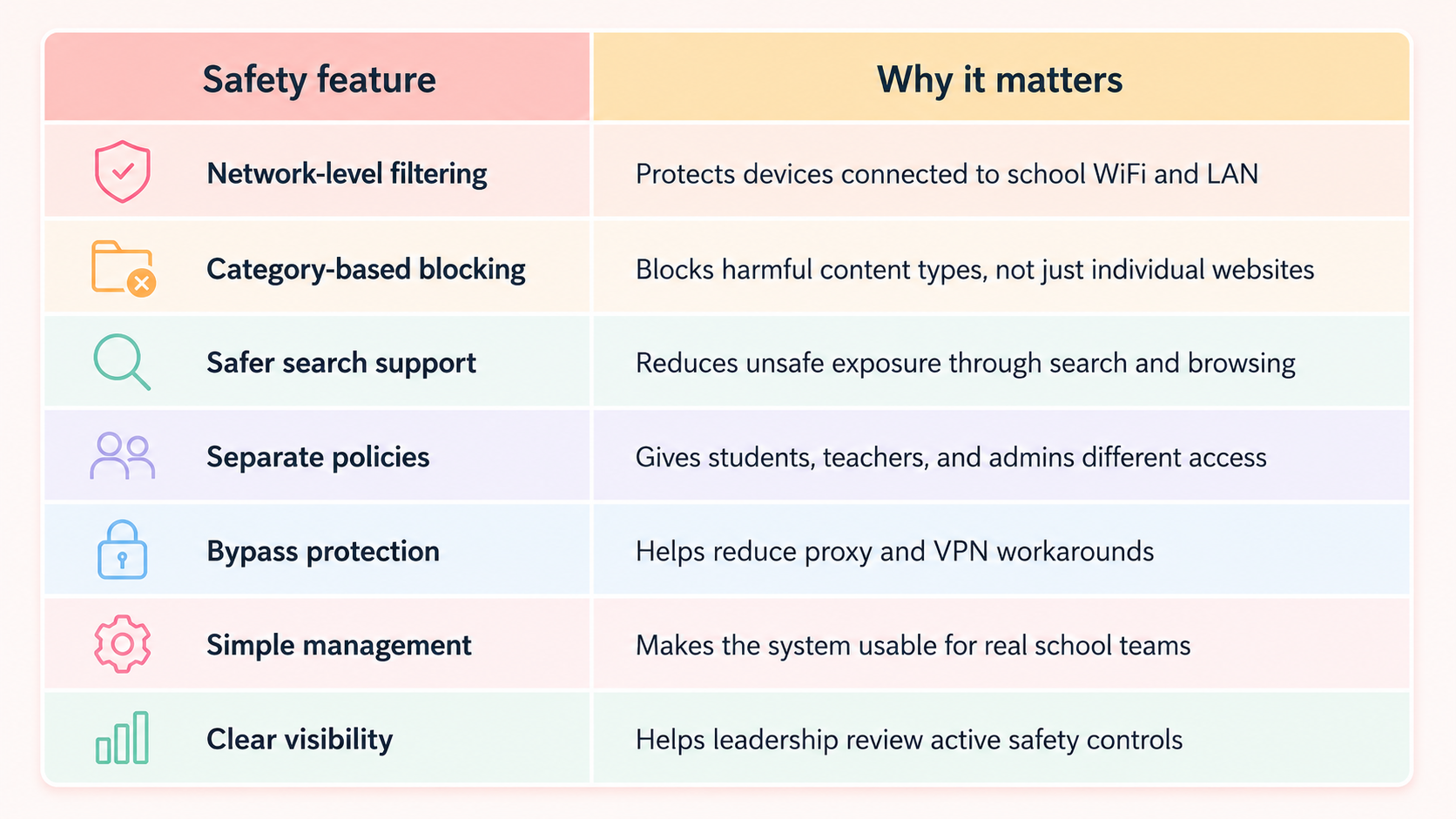
Where Happinetz Campus fits in
Happinetz Campus is built for schools that want safer internet across the campus without adding heavy IT work. You can start your free trial today to test this out.
It uses AI/ML-powered internet filtering and DNS-level protection to help schools block harmful, unsafe, and distracting content across devices connected to the school network. Because it works at the network level, schools do not need to install apps on every student device.
Happinetz Campus also supports centralised policy control, so schools can create safer access for students while allowing teachers and administrators the access they need.
For parents, this means the school has a visible internet safety system.
For school leaders, it means safer digital learning without making daily IT management harder.
Common signs that school internet may not be safe enough
A school may need stronger internet safety if students can freely access gaming sites, adult content, social media, gambling pages, proxy websites, or unsafe search results on the school network.
Other warning signs include teachers frequently catching students on unrelated websites, IT teams blocking links only after incidents, no separate access rules for students and staff, and no clear answer when parents ask how student browsing is protected.
If the school’s answer is only “teachers supervise them,” the system is too weak.
FAQs
What makes school internet safe for children?
School internet is safe for children when it blocks harmful content, reduces distractions, supports safer search, protects all connected devices, and gives the school clear control over student access.
Is school WiFi safe by default?
No. School WiFi only provides internet access. It becomes safer when filtering, browsing controls, category blocking, and student-specific access rules are added.
Can children access harmful content even on school devices?
Yes, if the school network does not have proper filtering. Harmful content can appear through websites, search results, images, videos, ads, proxy links, and shared links.
Should schools block gaming and entertainment sites?
Schools should restrict gaming and non-educational entertainment during learning hours. Teachers may still need access to some platforms for classroom use, so separate policies are useful.
Is a firewall enough to make school internet safe?
No. A firewall protects the network from certain threats. It does not automatically control what children can access online. Schools need content filtering along with network security.
Why should parents ask about school internet filtering?
Parents should ask because children use school internet for learning. A school should be able to explain how it prevents exposure to unsafe, distracting, or age-inappropriate content.
Final word
Safe school internet is not about banning technology. It is about making sure children can use digital tools without being left open to the full internet.
For schools, this is now part of student safety. For parents, it is a trust question. The best internet safety systems work quietly in the background, keep learning access open, and reduce the risks children should not have to manage on their own.